

Click on a title to open that help article
- Sign up/edit your profile
When you're ready to join us and look for homemates, you need to start by completing our profile questionnaire.
Video file- Add an image to your profile
You can add an image to your account when you're logged in by going to swlt.ca/user. Click on Edit, then scroll down to Picture, then Choose file to upload.
Video file- You see an Access Denied message instead of content
All of our subscriber content (profiles and chat) require you to be logged in.
If you see Access denied, then you are not logged in, or your account doesn't have the correct role (if you see Logout on the menu but still can't access content, contact web@swlt.ca to check your account).
Go to the menu at the top of the screen - if you see Logout, you are logged in. If you see Login you have to log in to see private content.
Image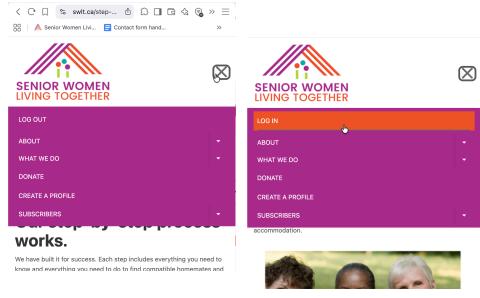
SWLT menu on small screens (tablets, phones). Log out left, Login right Image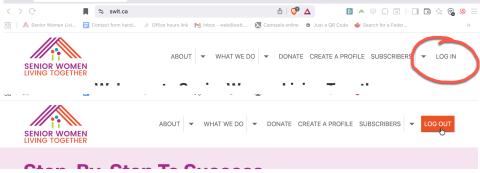
SWLT menu on larger (over 1000px) screens. Login top, Logout bottom. - Forgot your password?
If you don't know your password, it can be reset by email.
On the login screen, select Forgot password, and then enter your email address or username and click Submit.
In your email, find the reset message, and click on the link (it can only be used once).
On the website, click on the Login button. This will land you on your login user page. You will have to enter your Password twice, then scroll down and Save.
You're already logged in, so you can proceed to Subscriber resources or chat.
Video file- Searching for Subscriber Profiles
Now you can start to look for other people who you might want to meet at https://swlt.ca/profile-search
Video file- Join us in chat
The place to chat with other users is in Discourse (chat.swlt.ca).
There's a button on most logged in pages, as well as a link under Subscribers in the menu and user profiles. Your chat account will be activated as soon as you click on any of these links.
Image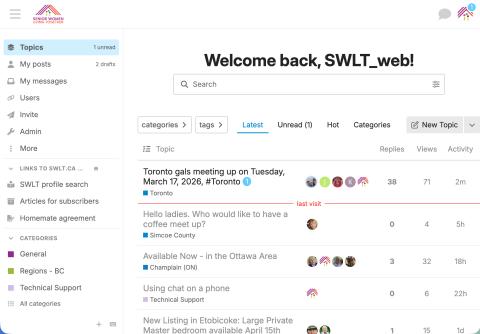
In chat, you can create and reply to Topics (discussions in categories that may be seen by all subscribers), Group chats (join open groups or invite others to a more private conversation), and DMs (direct messages between you and another person).
Note: If you find a profile that looks interesting, but can't find the username in chat, that means that person has not clicked on the link. Please send a DM to @swlt_web with the username you're looking for and we'll check it out.
You should set notification preferences to receive email when you're mentioned, or a topic you're following is updated. You may reply by email, but remember that just places your reply in the system -- it doesn't show you the context (what other people may be talking about).
Chat.swlt.ca uses Single Sign-On with our website, so now, when you have a profile on SWLT.ca, you automatically get an account on SWLT's Discourse as soon as you go to chat to activate. It uses the same username as your profile. To change your username, please contact Kathryn (@swlt_web in Discourse, web@swlt.ca by email).
We'll all be learning together, so talk to the women in your region's category, and ask questions and share tips in the Technical Support Category.
There are some video tutorials at /using-chatswltca
Getting help
If you need tech support, contact web@swlt.ca by email or @swlt_web in https://chat.swlt.ca to ask a question or arrange a video call.